

Show Menu












Headquarters - Springdale
4055 W. Sunset
Springdale, AR 72762
479-717-1900
P. O. Box 6490
Springdale, AR 72766
Monday thru Friday 8:00am - 5:00pm
Monday thru Friday: 7:30am - 6:00pm
Saturday: 9:00am - 12:00pm
Monday thru Friday: 7:00am - 7:00pm
Saturday: 9:00am - 12:00pm
East Springdale
2081 Butterfield Coach Rd.
Springdale, AR 72764
479-717-1992
P. O. Box 6490
Springdale, AR 72766
Monday thru Friday 8:00am - 5:00pm
Monday thru Friday 8:00am - 5:00pm
Monday thru Friday 7:00am - 7:00pm
Saturday 9:00am - 12:00pm
South Springdale
3607 S. Thompson
Springdale, AR 72764
479-717-1991
P. O. Box 6490
Springdale, AR 72766
Monday thru Friday 8:00am - 5:00pm
Monday thru Friday 8:00am - 5:00pm
Monday thru Friday 7:00am - 7:00pm
Saturday 9:00am - 12:00pm
Pinnacle
4901 W. Pauline Whitaker Parkway
Rogers, AR 72758
479-286-2100
P. O. Box 6490
Springdale, AR 72766
Monday thru Friday: 8:00am - 5:00pm
Monday thru Friday: 8:00am - 5:00pm
Saturday: 9:00am - 12:00pm
Monday thru Friday 7:00am - 7:00pm
Saturday 9:00am - 12:00pm
Fayetteville
1325 E. Joyce Blvd
Fayetteville, AR 72703
479-717-1990
P. O. Box 6490
Springdale, AR 72766
Monday thru Friday: 8:00am - 5:00pm
Monday thru Friday: 8:00am - 5:00pm
Monday thru Friday 7:00am - 7:00pm
Saturday 9:00am - 12:00pm
Bentonville
2904 South Walton Blvd. Bentonville, AR 72712
479-876-8293
P. O. Box 6490
Springdale, AR 72766
Monday thru Friday: 8:00am - 5:00pm
Monday thru Friday: 8:00am - 5:00pm
Monday thru Friday 7:00am - 7:00pm
Saturday 9:00am - 12:00pm
Gravette
211 Main St SE Gravette, AR 72736
479-787-5251
PO Box 6490 Springdale, AR 72766
Monday thru Friday: 8:00am - 5:00pm
Monday thru Friday:
8:00am - 5:00pm
Saturday: 9:00am - 12:00pm
Monday thru Friday: 7:00am - 7:00pm
Saturday: 9:00am - 12:00pm
Hiwasse
13540 W Hwy 72 Hiwasse, AR 72739
479-787-7779
PO Box 6490 Springdale, AR 72766
Monday thru Friday: 8:00am - 5:00pm
Monday thru Friday: 8:00am - 5:00pm
Monday thru Friday: 7:00am - 7:00pm
Saturday: 9:00am - 12:00pm
Lincoln
205 W. Pridemore Drive
Lincoln, AR 72744
479-439-4246
P. O. Box 6490
Springdale, AR 72766
Monday thru Friday 8:00am - 5:00pm
Monday thru Friday 8:00am - 5:00pm
Monday thru Friday 7:00am - 7:00pm
Saturday 9:00am - 12:00pm
Downtown Bentonville
107 NW 2nd Street,
Bentonville, AR 72712
479-334-2068
P. O. Box 6490
Springdale, AR 72766
Monday thru Friday 8am-5pm
Monday thru Friday 7am-7pm

Before starting the login process, read the bullet points below:
 Login Instructions for App
1. Download the new LegacyNow app from the app store.
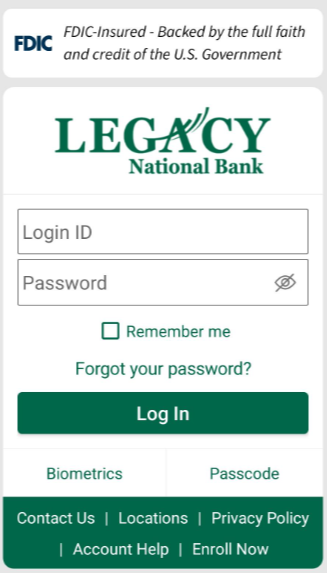
2. Once you have downloaded the LegacyNOW app, input your Login ID and Password. Click “Log In”
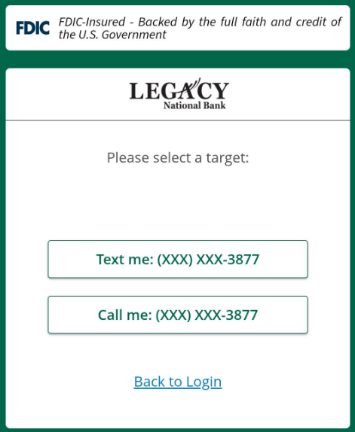
3. Choose to receive your Secure Access Code (SAC) through either Text or Call.
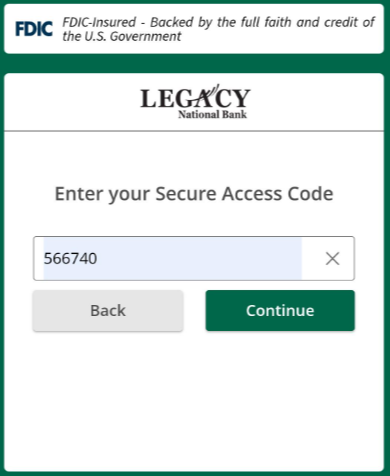
4. Enter your Secure Access Code (SAC), then click “Continue”.
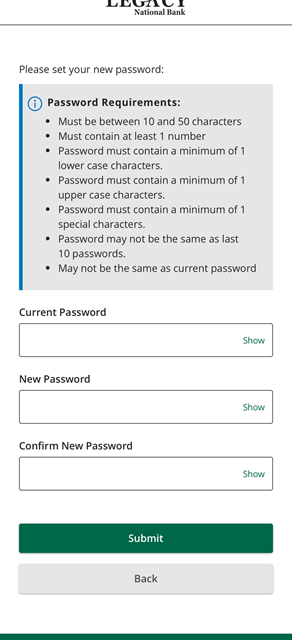
5. The next screen will prompt you to enter your current password, as well as a new one.
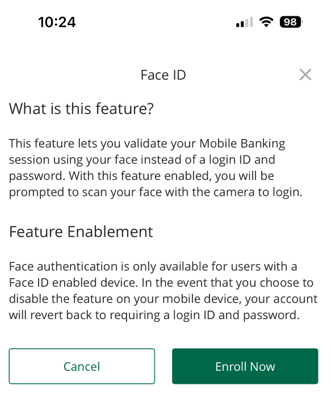
6. At this point you may receive a pop up on your mobile phone asking if you would like to enroll in Face ID.
7. The next screen asks if you would like to allow push notifications, as well as enabling your device for 2 Factor Authentication.
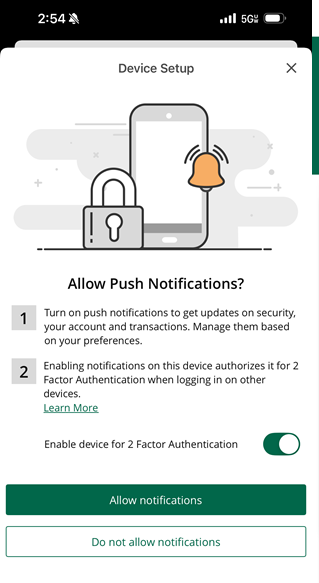
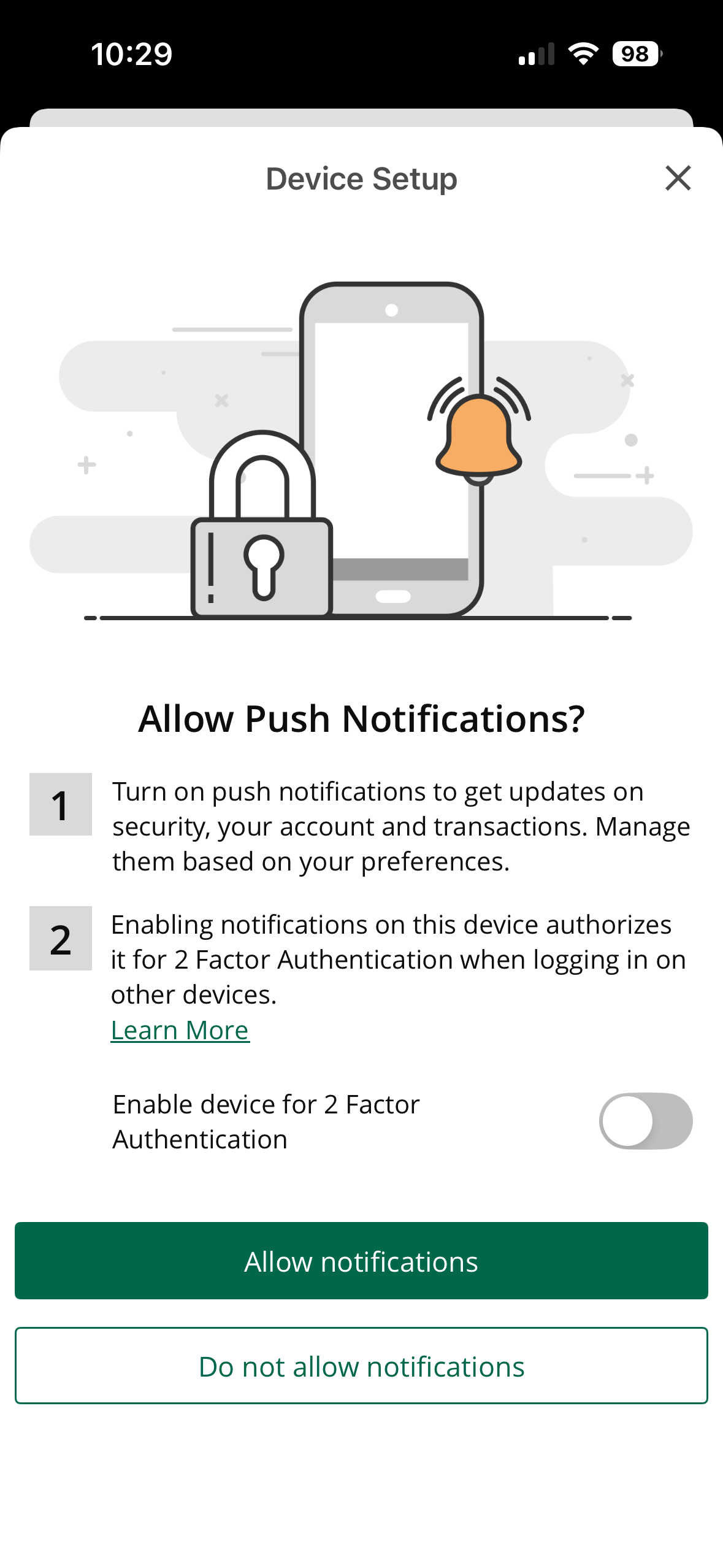
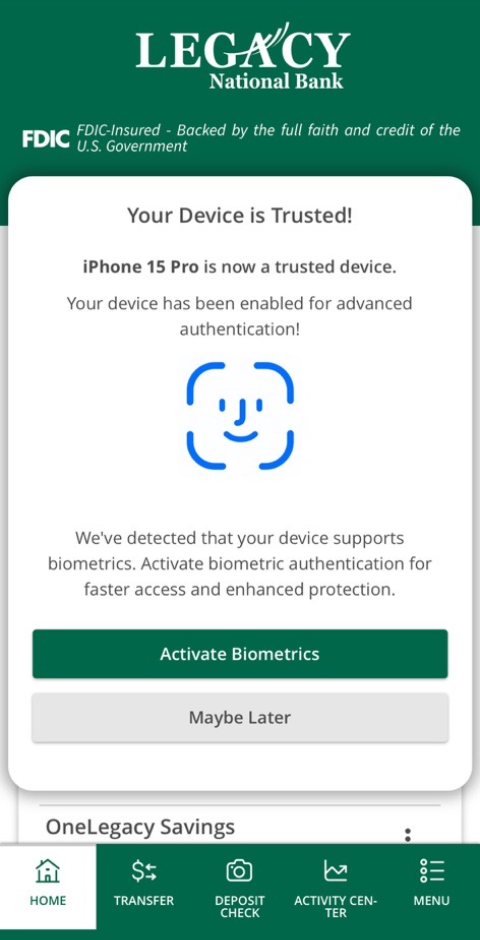
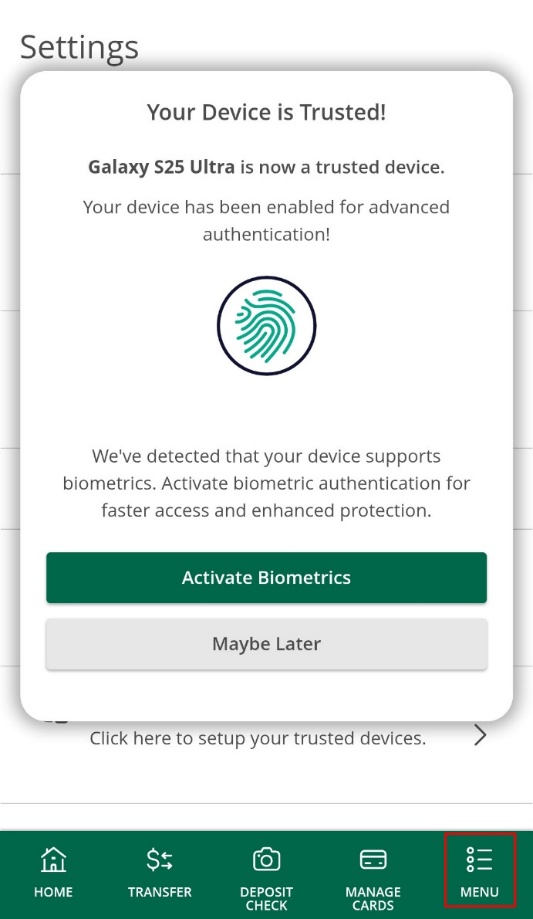
8. Choose whether to activate your Biometrics now or later. Below are screenshots from both an Android and an iPhone
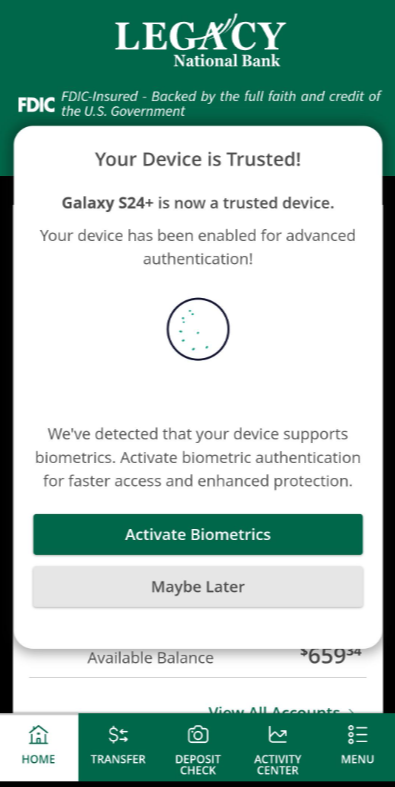
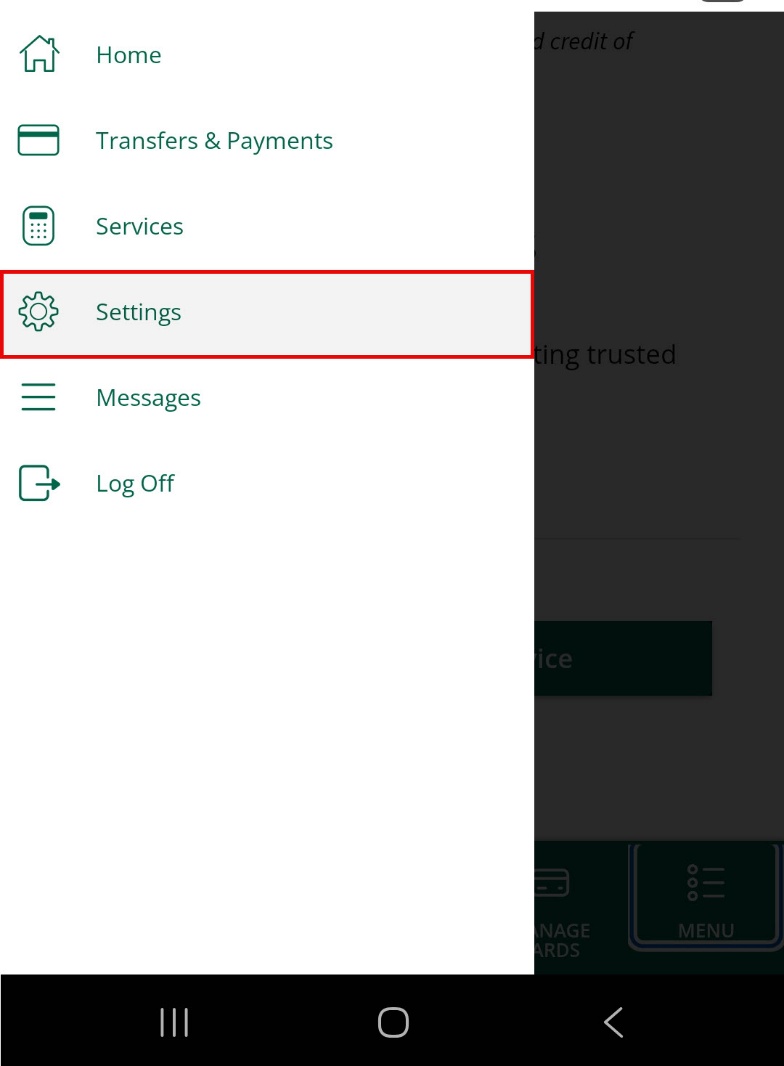
9. When you choose “Activate Biometrics”, the below screen will pop up. Click “Confirm”.

10. Your mobile phone should prompt you to complete your biometrics by either using your fingerprint or FaceID.
11. Once you have completed enabling your biometrics, you will receive the below message. Click “Close”.
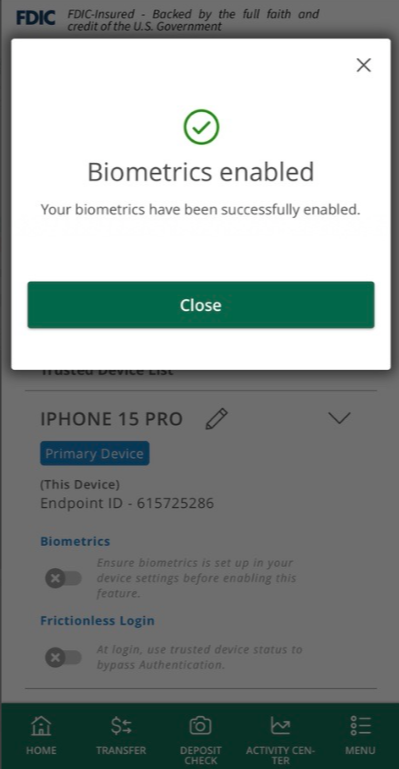
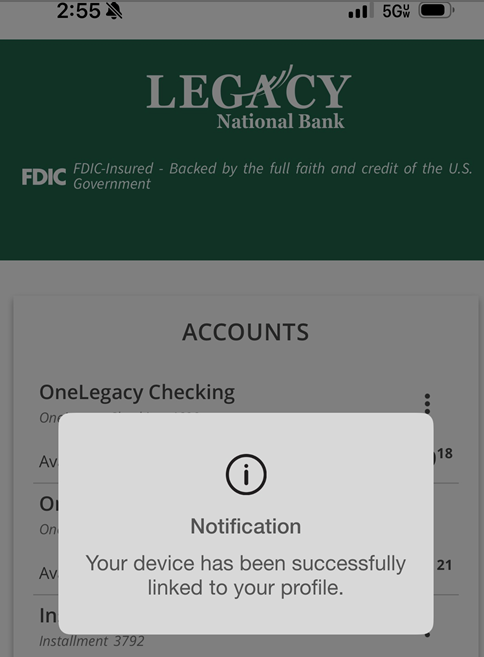
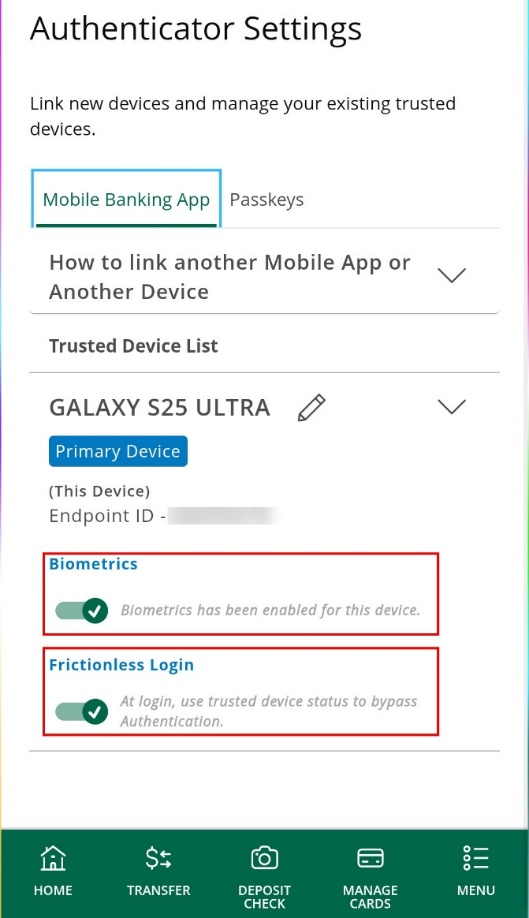
12. In addition to setting up biometrics, it is also recommended to enable “Frictionless Login”. Once you select Frictionless Login, you should receive a notification letting you know your device has been successfully linked to your profile.
This completes the process of logging into your LegacyNOW account via the mobile app.
Are you a new or existing customer?
Now Leaving Legacy Bank.
You are about to visit a third-party site not operated by Legacy Bank, a FDIC-insured institution.
Legacy Bank’s privacy policy and security practices do not apply to the site you are about to enter, please review the third-party's privacy and security practices.